 Stint
Stint
Coming soon to iPhone & Android
Track the work.
Not the pauses.
A calm timer for real work days. Plan a session, switch between projects and tasks in one tap, and review your day and week. Offline, with no account.
Join the waitlist and we’ll email you a launch promo code.
Paused time never counts toward your work
Works offline. Your hours stay on your phone.
Why Stint
A timer you can trust.
The timer kept running while you made coffee, and now your day is off by an hour.
Pause it. Paused time is never counted, in any total.
Switching tasks means stopping one timer and starting another.
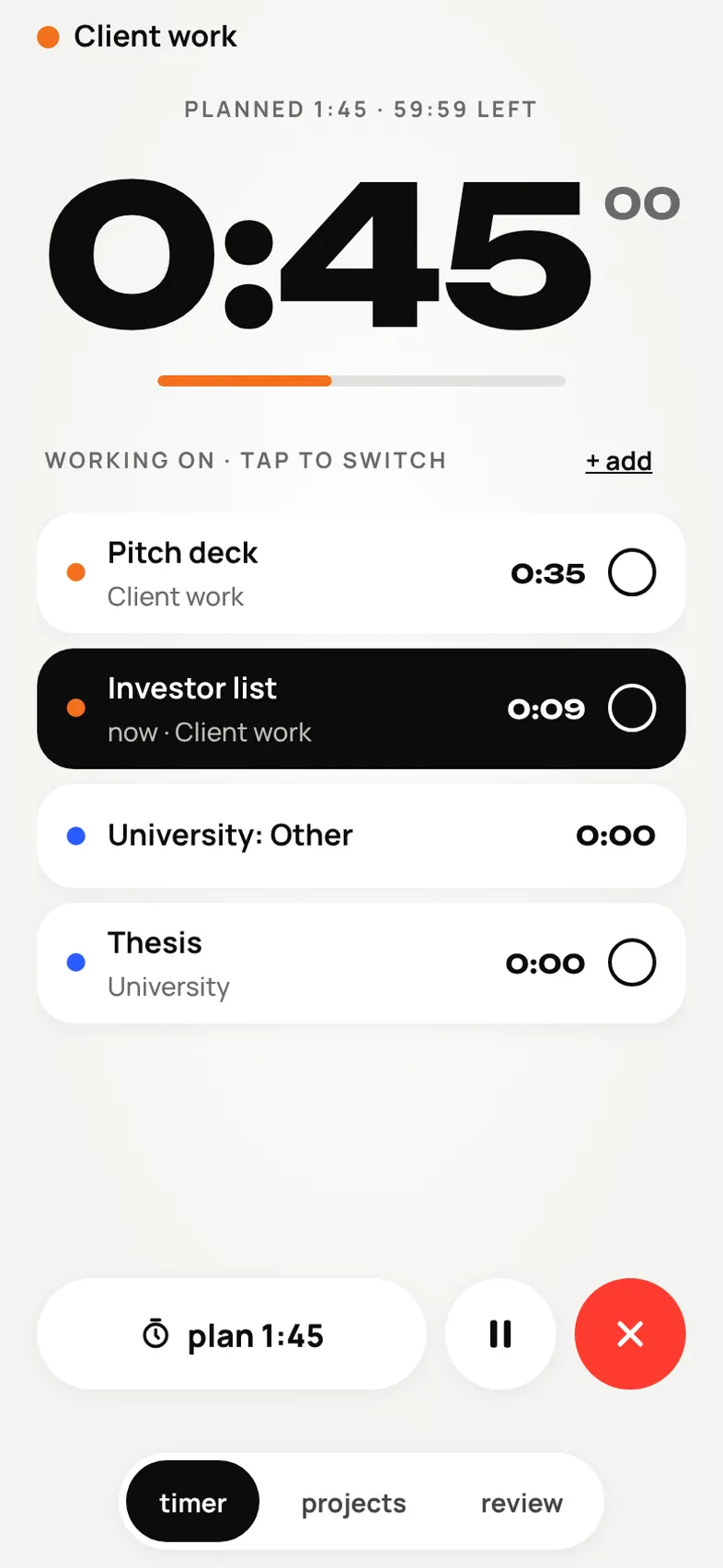
Tap the next task. Time before the switch stays put and only new time moves.
You have to make an account before you can track anything.
Open it and start. It works offline and keeps everything on your phone.
How it works
Four steps, one clear day
- 1
Plan a session
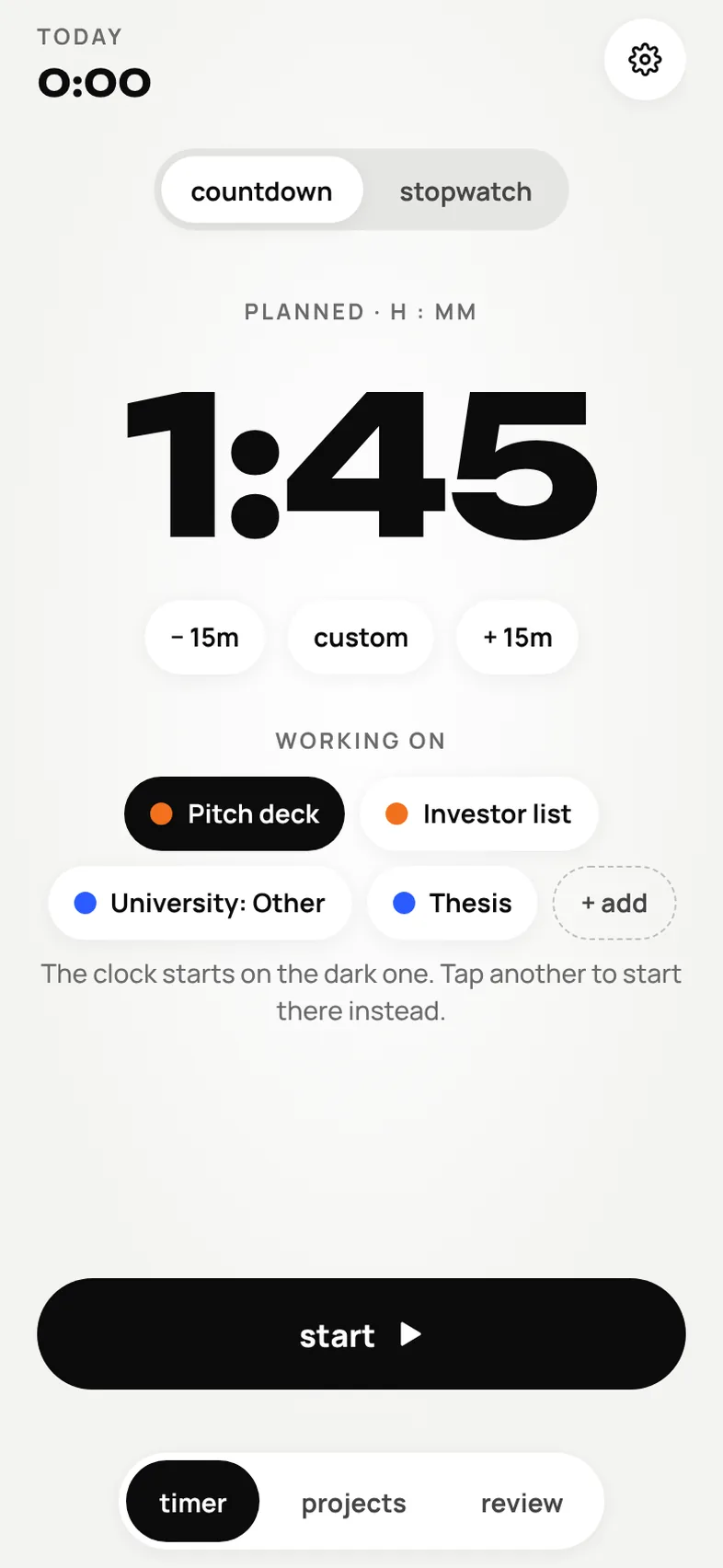
Pick a countdown such as 1h 45m, your own time, or an open-ended stopwatch. Line up the projects and tasks you’ll work on, and tap start.
- 2
Switch with one tap
Tap another task and the clock moves to it. Time before the switch stays where it was, and adding a task never moves any time.
- 3
Keep going past the plan
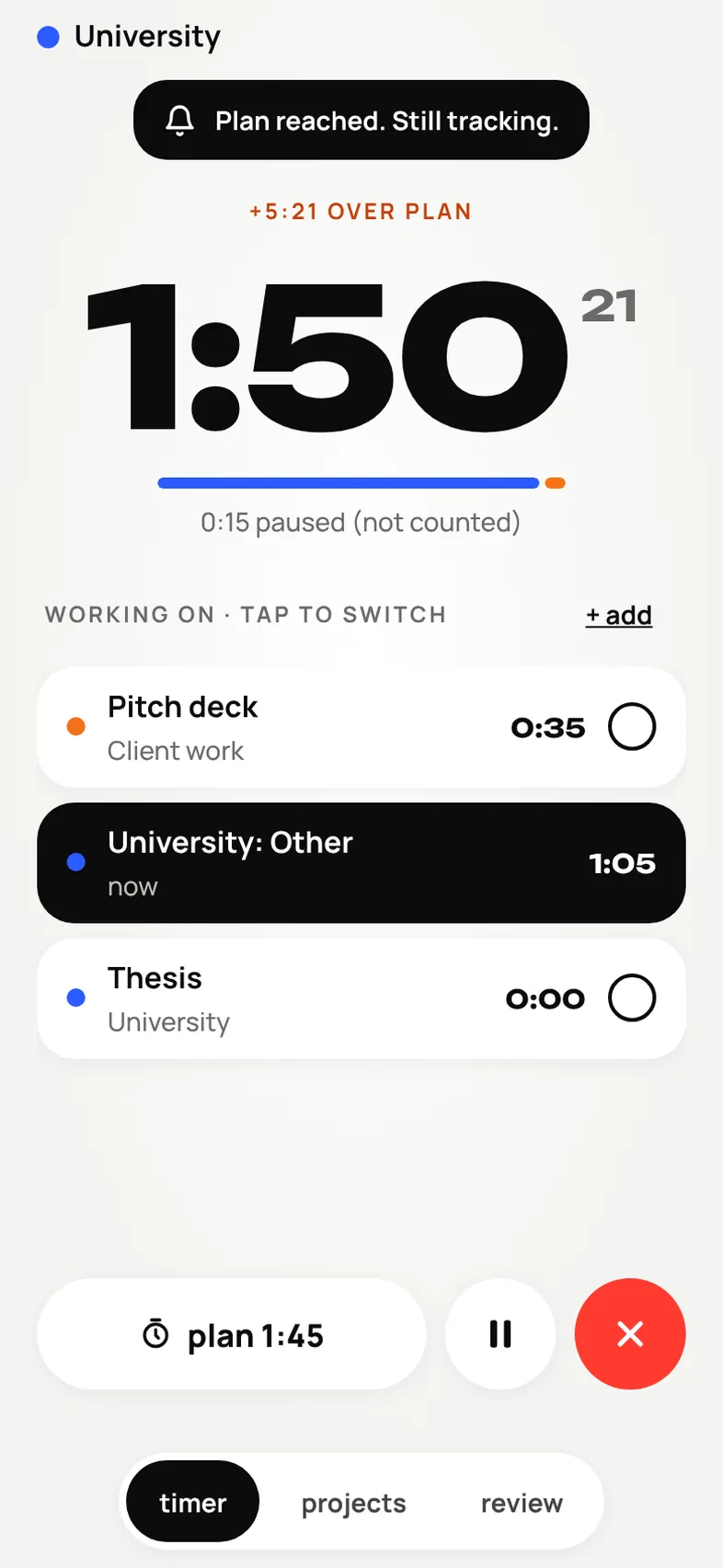
When the plan is up you get a notification, and the timer carries on as overtime, shown separately from what you planned. Pauses never use up the plan.
- 4
Review your day and week
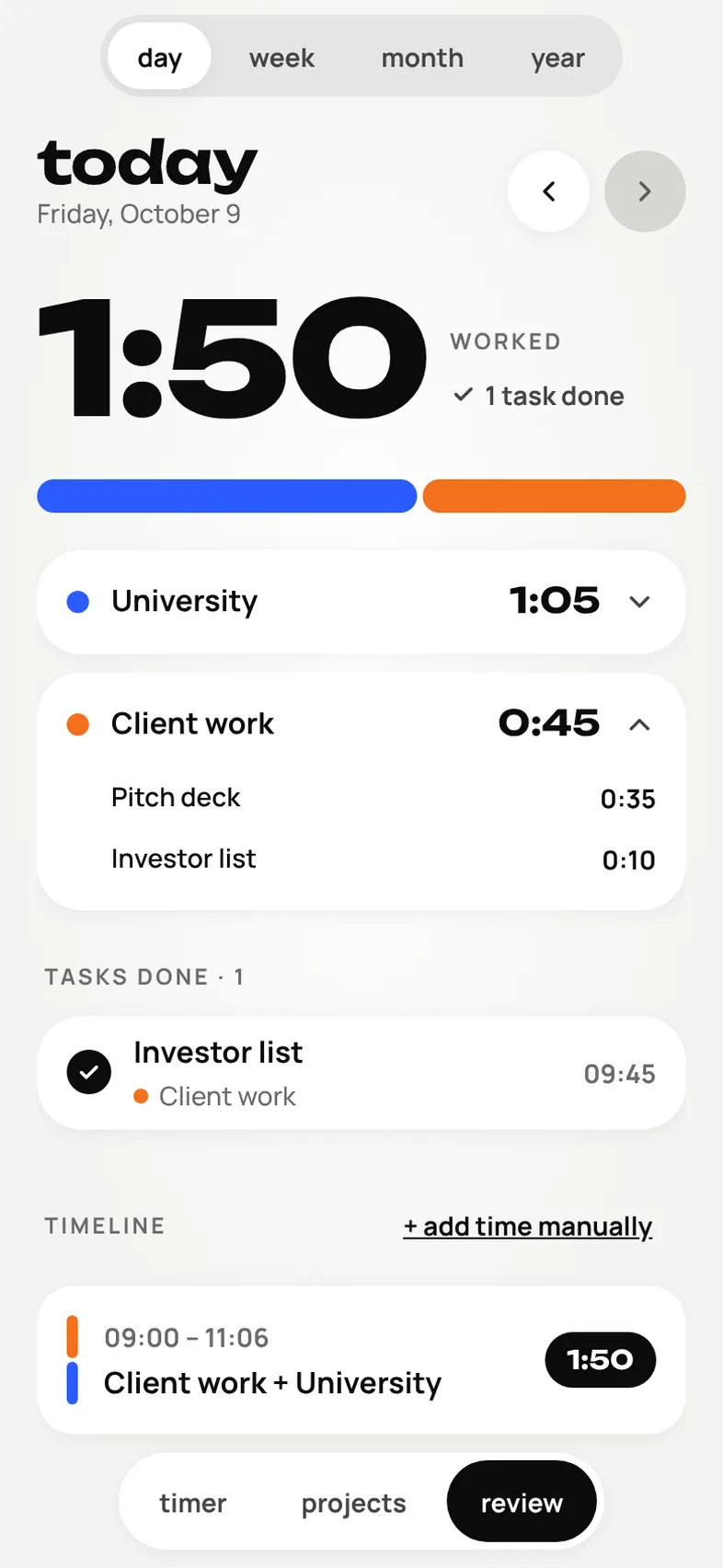
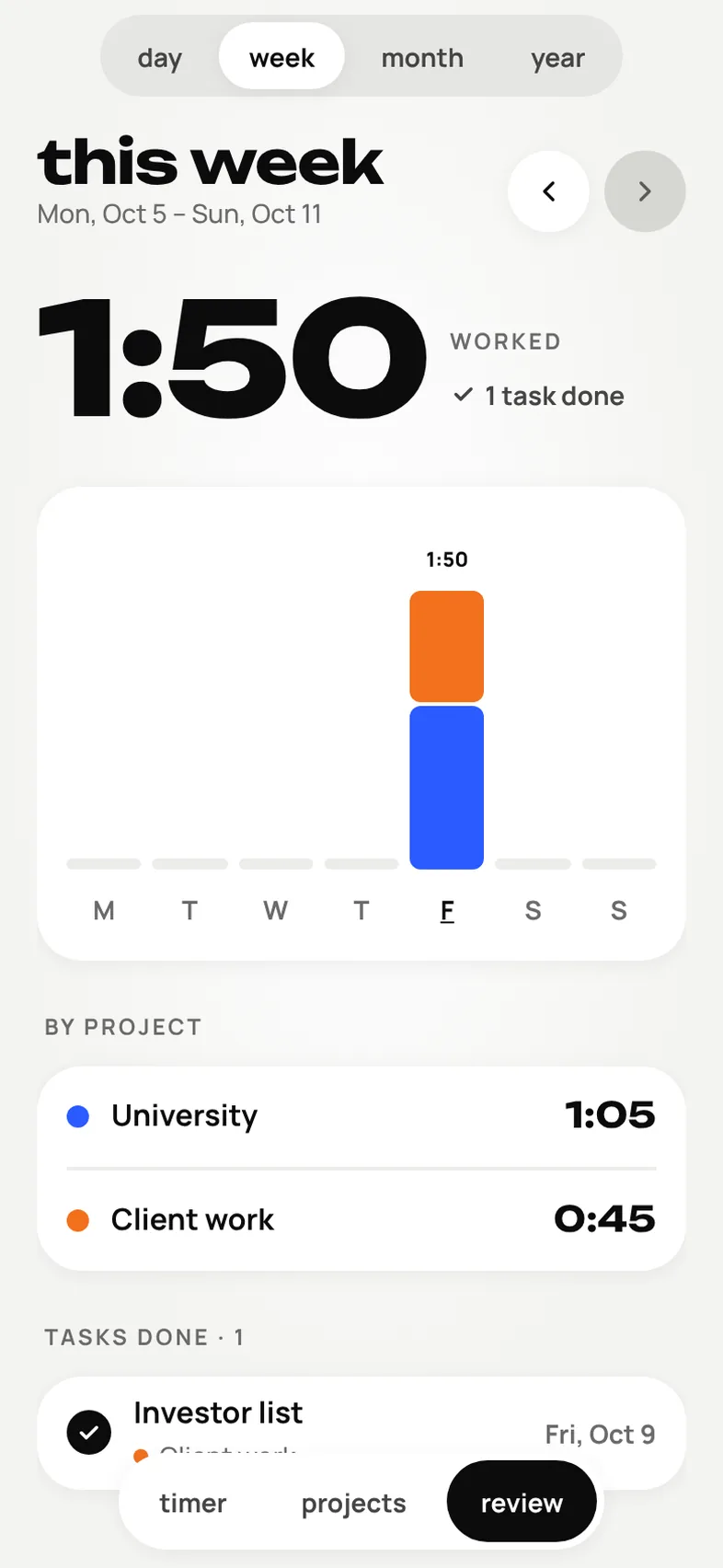
Finish and the session is saved at once. See today as a colored bar by project, with task times and a timeline, then step back through weeks, months and the year.
What’s inside
Made for real work days
Countdown or stopwatch
Plan a session of any length or run an open-ended stopwatch. Change the plan mid-session without losing a second.
Pauses never count
Work time is worked out from saved timestamps, so pausing, locking your phone or closing the app can’t lose or double-count time.
Projects and tasks, your way
Create your own color-coded projects and shallow task lists, and line up several at once. Tick a task off and the clock moves on.
Day, week, month and year
A colored breakdown by project, task times, a timeline, and heatmaps for the month and year. Weeks run Monday to Sunday.
Fix it afterwards
Edit a session, delete it, or add work you forgot to track. Edits are checked so times can’t go negative or overlap, and midnight is split correctly.
An evening review, if you want one
Turn on a daily reminder at a time you choose. It’s off until you say so, and tapping it opens today’s review.
Your privacy
Your hours stay yours
Stint keeps your projects, tasks and sessions on your phone. Nothing is uploaded, and there’s no account to make.
- It all stays on your phoneProjects, tasks, sessions and settings are stored on this device. There is no account, no server and no internet connection needed.
- No ads, no analytics, no AIThere are no ad networks, no tracking and no analytics, and nothing you track is read by an AI service.
- Reminders are localThe plan-finished and evening notifications are scheduled on your phone. If you say no to notifications, tracking works exactly the same.
- Your backup, your fileExport everything as a JSON file whenever you like. A restore is checked first and asks before it replaces anything.
FAQ
Questions, answered
When does Stint launch?
Soon, on iPhone and Android. Join the waitlist and we’ll email you the day it goes live.
What do I get for joining the waitlist?
An email when Stint launches, with a promo code for waitlist members. We send the code by email only, and it won’t appear on this page.
Do pauses count as work time?
No. Paused time is left out of every total, and it doesn’t use up your planned duration either. The app shows it separately, as “paused (not counted)”.
What happens when my planned time runs out?
You get a notification, if you’ve allowed them, and the timer keeps going as overtime until you finish. Planned time and actual work time are always shown separately.
What if I close the app or lock my phone?
Nothing is lost. The app saves when the session started and when you paused, then works out the elapsed time from those, so it’s right when you come back.
Can I add time I forgot to track?
Yes. Add time manually for any day, or edit a session’s times, project and tasks. The app stops edits that would overlap another session or give a negative time, and every total updates.
Do I need an account?
No. There’s no sign-up and no server holding your hours. Everything lives on your phone.
Will my data sync to a new phone?
Not in this first version. Export a JSON backup from Settings and restore it on the new phone. A restore is checked first and asks before it replaces anything.
How much does it cost?
We haven’t set the price yet. When Stint launches, the price will be shown in the App Store and Google Play, not here. There are no ads.
Will you spam me?
No. We’ll only email you about Stint’s launch and your promo code, and every email has an unsubscribe link.
Be first in line when Stint launches
Join the waitlist and we’ll email you a promo code on launch day.